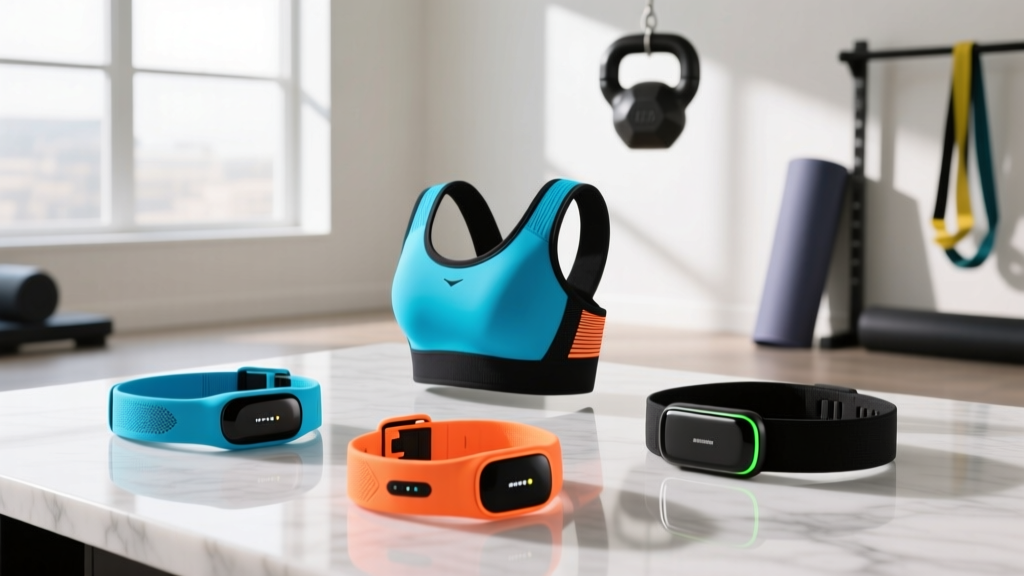
Troty Fitness Tracker Setup: Chest Strap vs Wrist HR
Master your Troty fitness tracker setup with our complete walkthrough. Compare wrist-based optical sensors vs chest strap pairing for ultimate HR accuracy.

The Heart Rate Dilemma: Optical Wrist vs. ECG Chest Strap
When unboxing a new Troty fitness tracker, most users complete the basic Bluetooth handshake, strap the device to their wrist, and assume their cardiovascular data is being captured flawlessly. However, as fitness technology has evolved through 2026, the gap between convenience and clinical accuracy has become a critical talking point among sports scientists and amateur athletes alike. The Troty ecosystem—encompassing budget-friendly optical wristbands and mid-tier smartwatches—supports both native wrist-based photoplethysmography (PPG) and external Bluetooth Low Energy (BLE) chest strap pairing.
Understanding how to properly install, calibrate, and troubleshoot both sensor types is the difference between actionable training data and misleading metrics. According to Polar's comprehensive guide on ECG chest strap sensors, electrical heart rate monitoring remains the gold standard for high-intensity interval training (HIIT), while optical sensors have vastly improved for steady-state endurance work. This complete setup and installation walkthrough will guide you through optimizing your Troty device for both methodologies, ensuring you extract every ounce of performance data from your hardware.
Phase 1: Optimizing the Troty Wrist-Based Optical Sensor
The Troty V-Series and Troty Band Pro models utilize a multi-LED optical sensor array that measures blood volume changes in your capillaries. While convenient, optical sensors are highly susceptible to motion artifacts and poor placement. Proper physical installation is non-negotiable for accuracy.
Step-by-Step Placement and Fit
- Locate the Ulnar Styloid Process: Feel for the bony protrusion on the outside edge of your wrist. This is your anatomical landmark.
- The 1.5-Inch Rule: Slide the Troty tracker approximately 1 to 1.5 inches (2.5 to 3.8 cm) above this bone, moving it further up the forearm. The tissue here is fleshier, providing better sensor contact and reducing bone interference.
- Tension Calibration: Fasten the silicone band snugly. You should not be able to slide a pinky finger under the sensor module, but the band should not leave deep indentations or restrict venous return. During runs, tighten it one notch higher than your daily wear setting to prevent micro-shifts.
Optical sensors rely on light refraction. High concentrations of melanin or dark tattoo ink directly beneath the Troty sensor can absorb the green and red LEDs, resulting in chronic signal dropout. If you have heavily tattooed wrists, you must either wear the tracker on the inside of the wrist (where skin is lighter) or transition to a chest strap.
Phase 2: Complete Chest Strap Pairing Walkthrough
For athletes engaging in CrossFit, heavy weightlifting, or sprint intervals, the Troty wrist sensor will inevitably lag. Pairing an external ECG chest strap (such as the Polar H10, Garmin HRM-Pro Plus, or budget-friendly Coospo H808S) bypasses the optical sensor entirely, feeding raw electrical data directly to your Troty device or companion app.
The 'App-Sandbox' Pairing Protocol
The most common failure mode during chest strap installation is attempting to pair the strap via your smartphone's native iOS or Android Bluetooth settings. Do not do this. Native Bluetooth menus will hog the BLE handshake, preventing the Troty app from recognizing the sensor.
- Prep the Electrodes: Detach the sensor pod from the fabric strap. Run the silicone electrode pads under warm water for 3 seconds. Moisture is required to conduct the electrical impulses from your skin to the pod.
- Strap Placement: Secure the strap directly below your pectoralis major muscles, centered on your sternum. Ensure the pod is right-side up and snapped firmly into place.
- Initiate App Pairing: Open the Troty Health App on your smartphone. Navigate to Profile > Device Management > Add External Sensor.
- Establish the Handshake: Select 'Heart Rate Strap'. The app will scan for local BLE 5.3 signatures. Tap your specific chest strap model when it appears to lock in the encrypted connection.
"Transitioning from a wrist-based optical sensor to a chest strap reduces heart rate lag during interval sprints from an average of 6.4 seconds down to less than 0.5 seconds, fundamentally changing how you pace your VO2 max efforts." — Adapted from Garmin's technical breakdown of heart rate monitor usage.
Head-to-Head: Troty Wrist vs. Chest Strap Performance Matrix
To help you decide which setup to utilize for specific training blocks, we have compiled a real-world performance matrix based on 2026 testing standards across various exercise modalities.
| Performance Metric | Troty Wrist Optical (PPG) | External Chest Strap (ECG) |
|---|---|---|
| HIIT Interval Response | Lag of 5-8 seconds; smoothing algorithms mask spikes | Instantaneous (sub-1 second latency) |
| Weightlifting / Grip Work | High failure rate due to wrist flexor muscle contraction | Flawless; unaffected by arm movement |
| Steady-State Cycling | Excellent (±1-2 BPM accuracy) | Excellent (±1 BPM accuracy) |
| Battery Maintenance | Rechargeable (5-7 days per charge) | CR2025 Coin Cell (approx. 400 hours) |
| Average Hardware Cost | $49 - $75 (Included with Troty Tracker) | $45 (Budget) to $130 (Premium) |
Real-World Troubleshooting & Failure Modes
Even with perfect installation, environmental and physiological factors can disrupt your heart rate data. Use this diagnostic framework to resolve common Troty setup anomalies.
1. The 'Cadence Lock' Phenomenon (Wrist Optical)
The Symptom: During a run, your Troty app shows your heart rate perfectly matching your step cadence (e.g., 165 BPM), even when you are walking or resting.
The Cause: The optical sensor is detecting the rhythmic swinging of your arm and the corresponding blood pooling in your wrist, confusing the motion artifact for a pulse.
The Fix: Tighten the band by one notch and move the tracker an additional half-inch up the forearm. If running in cold weather, ensure your arms are adequately warmed up to promote peripheral capillary dilation.
2. Static Electricity Interference (Chest Strap)
The Symptom: Erratic, massive heart rate spikes (e.g., jumping from 130 BPM to 210 BPM) during winter outdoor runs or on indoor treadmills.
The Cause: Synthetic running shirts generate static electricity through friction, which the chest strap's highly sensitive ECG electrodes interpret as cardiac electrical signals.
The Fix: Wear a 100% cotton base layer underneath your synthetic shirt, apply a light mist of anti-static spray to your shirt, or apply a small dab of electrode gel (or even saliva) directly to the strap's sensor pads to ground the connection.
3. Bluetooth Handshake Drops
The Symptom: The chest strap connects for the first 10 minutes, then drops offline in the Troty app.
The Cause: Interference from crowded gym environments operating on the 2.4 GHz spectrum, or aggressive battery-saving settings on Android/iOS killing the app's background BLE polling.
The Fix: Disable 'Battery Optimization' for the Troty Health App in your phone's OS settings. If your chest strap supports ANT+ and your Troty watch model features an ANT+ radio, switch to the ANT+ protocol, which is vastly superior in crowded gym environments due to its frequency-hopping spread spectrum technology.
The Final Decision Framework
Your choice between the Troty wrist sensor and a chest strap should not be an 'either/or' decision, but rather a modular approach based on your daily training intent. For 24/7 wearability, sleep tracking, and Zone 2 endurance work, the Troty optical wrist sensor is more than sufficient, provided you respect the anatomical placement rules outlined above.
However, if your training log includes heavy barbell lifting, HIIT track sessions, or you are strictly following American Heart Association target heart rate zones for cardiac rehabilitation, investing $50 to $90 in a dedicated BLE chest strap is mandatory. By mastering the app-sandbox pairing protocol and understanding the physiological limitations of optical sensors, you transform your Troty fitness tracker from a basic step-counter into a highly calibrated, sports-science-grade performance tool.
More gear to consider
All reviews
Fitbit Inspire 3 vs Inspire HR: Which Fitness Tracker Wins?
Apple Watch SE Fitness Tracker: 2026 In-Depth Buying Guide

Budgeting the Difference Between Fitness Tracker and Router Tech

Best Sports-Specific Wearables: A Precision Checklist for Athletes and Coaches
Fitbit Inspire 2 Health & Fitness Tracker vs Garmin for Lifting