ProForm Pro 2000 vs Carbon TLX: How to Adjust a ProForm Treadmill Belt
Compare the ProForm SMART Pro 2000 and Carbon TLX. Plus, learn exactly how to adjust a ProForm treadmill belt for optimal 2026 home gym maintenance.

The 2026 Home Gym Dilemma: Premium vs. Budget Treadmills
When outfitting a home gym in 2026, the treadmill market is dominated by machines that promise interactive coaching and commercial-grade durability. However, as fitness equipment reviewers at FitGearPulse, we know that long-term satisfaction relies heavily on two factors: structural build quality and ease of maintenance. Buyers often obsess over screen size and incline percentages, but rarely ask about routine upkeep until month six of ownership. Understanding how to adjust a ProForm treadmill belt and maintain the drive system is just as critical as the initial purchase decision.
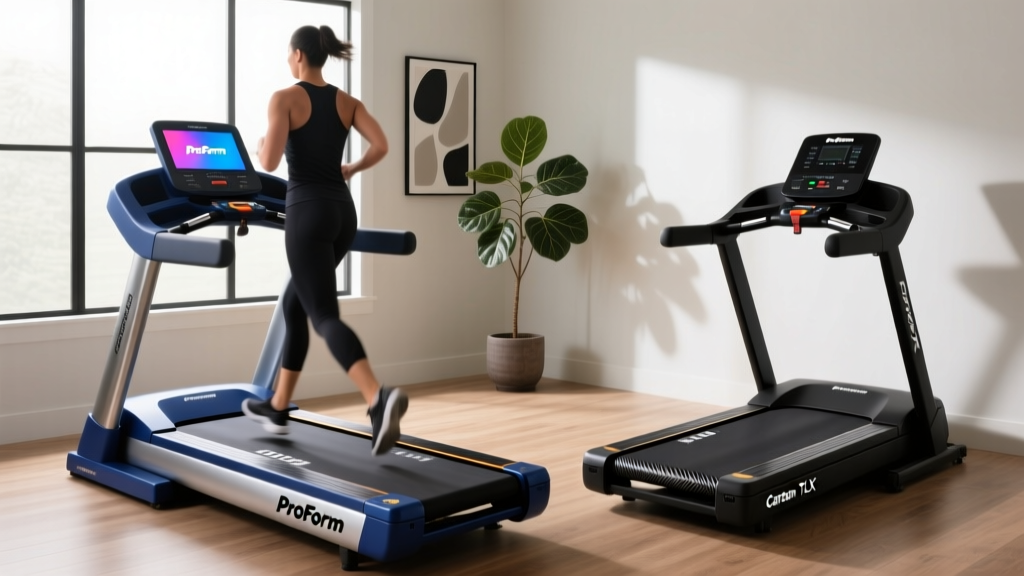
To illustrate this, we are putting two of ProForm's most popular 2026 models head-to-head: the premium ProForm SMART Pro 2000 (Model PFTL15224) and the budget-friendly ProForm Carbon TLX (Model PFTL59224). We will compare their core buying features and then dive deep into the exact, step-by-step maintenance procedures required to keep their belts running flawlessly.
Head-to-Head Feature Matrix: SMART Pro 2000 vs. Carbon TLX
Before we get to the wrenches and Allen keys, let us look at the raw specifications. According to Consumer Reports' treadmill buying guidelines, motor continuity and belt surface area are the primary indicators of a machine's lifespan. Here is how these two ProForm contenders stack up.
| Feature | ProForm SMART Pro 2000 | ProForm Carbon TLX |
|---|---|---|
| Motor | 3.25 CHP Mach Z Commercial | 3.0 CHP Standard |
| Belt Dimensions | 20' x 60' | 18' x 55' |
| Incline / Decline | -3% to 12% | 0% to 10% |
| Deck Cushioning | ProShox Cushioning (Adjustable) | Standard Cell Cushioning |
| Maintenance System | Maintenance-Free Belt | Re-Lube Manual System |
| 2026 Price Range | $1,199 - $1,299 | $649 - $749 |
Motor and Drive System Longevity
The SMART Pro 2000 features a 3.25 CHP Mach Z motor. The 'CHP' (Continuous Horsepower) rating is crucial; it means the motor can sustain this output indefinitely without overheating, a vital feature for runners logging over 20 miles a week. The Carbon TLX's 3.0 CHP motor is highly capable for walking, jogging, and light running, but may experience thermal throttling during high-incline interval sessions lasting over 45 minutes.
Deck Dimensions and Joint Health
The 20' x 60' belt on the Pro 2000 provides ample runway for tall runners (over 6'0'). The 18' x 55' belt on the Carbon TLX requires a slightly more compact stride. Furthermore, the Mayo Clinic notes that proper shock absorption is essential for reducing repetitive stress on the knees and lower back. The Pro 2000's adjustable ProShox cushioning allows users to toggle between a soft, joint-saving run and a firm, road-like feel, whereas the Carbon TLX offers a static, medium-firm impact.
The Ownership Reality: Maintenance and Belt Tension
Here is where the buying guide shifts from flashy features to practical reality. The Carbon TLX requires manual silicone lubrication every 150 miles or 3 months. The SMART Pro 2000 utilizes a pre-lubricated, maintenance-free belt system. However, regardless of the lubrication system, both machines will eventually require belt tension and tracking adjustments due to the natural stretching of the polyester-nylon weave under repetitive kinetic load.
Learning how to adjust a ProForm treadmill belt is a straightforward process, but doing it incorrectly can lead to snapped seams, stripped bolts, or motor burnout. Below is the definitive, expert-level guide to maintaining your ProForm drive system.
Step-by-Step: How to Adjust a ProForm Treadmill Belt
Over time, you may notice two distinct issues: slippage (the belt hesitates when your foot strikes) or drifting (the belt pulls to the left or right). Both are resolved via the rear idler roller adjustment bolts.
⚠ CRITICAL WARNING: Never adjust the belt while the machine is plugged in or running at high speeds. Over-tightening the belt puts massive lateral stress on the motor drive shaft and the front roller bearings, leading to catastrophic mechanical failure.Tools Required
- 3/16' Allen Wrench (Hex Key) - Usually included in the original ProForm hardware kit.
- A clean microfiber cloth.
- 100% Silicone Treadmill Lubricant (Only if you own the Carbon TLX or an older non-maintenance-free model).
The Adjustment Procedure
- Power Down and Locate: Unplug the treadmill from the wall. Move to the rear of the machine and locate the two idler roller adjustment bolts on the left and right end caps.
- Perform the 'Lift Test' (For Slippage): Reach under the center of the belt and lift it. A properly tensioned ProForm belt should lift exactly 3 to 4 inches off the walking deck. If it lifts higher than 4 inches, it is too loose and will slip. If it lifts less than 2 inches, it is over-tightened.
- Adjust Tension: Insert the 3/16' Allen wrench into both the left and right bolts. Turn both bolts clockwise exactly one-quarter (1/4) turn. Do not turn them a full rotation; micro-adjustments are key.
- Test the Tension: Plug the machine in, stand on the side rails, and start the belt at 3.0 MPH. Walk on it and perform heavy heel-strikes. If the belt still hesitates, unplug and repeat the 1/4 turn clockwise adjustment. Never exceed two full turns from the factory baseline.
Fixing Belt Drift (Tracking)
If your belt is drifting off-center, you must adjust the bolts asymmetrically. If the belt drifts to the left, turn the left adjustment bolt clockwise 1/4 turn, and turn the right adjustment bolt counter-clockwise 1/4 turn. If it drifts to the right, do the exact opposite. Run the machine at 4.0 MPH for two minutes to allow the belt to center itself. For more detailed schematic references, you can always consult the digital manual archives at ProForm's Official Support Hub.
Edge Cases: What If The Belt Still Slips?
If you have maxed out your rear roller adjustments (the bolts are tight, and the belt lift is under 2 inches) but the belt still slips underfoot, you are likely dealing with one of two advanced failure modes:
- Front Roller Drive Gear Failure: The internal plastic gear inside the front roller that grips the motor drive belt may be stripped. This requires a full front roller replacement (Part #184614 for most ProForm 20' decks).
- Worn Motor Drive Belt: The small ribbed belt connecting the motor to the front roller can lose its teeth. Remove the front motor hood (using a Phillips head screwdriver) and inspect the drive belt for missing rubber cogs.
Final Verdict: Which Model Earns Your Floor Space?
If your budget allows, the ProForm SMART Pro 2000 is the superior investment for 2026. The 3.25 CHP motor, 20' x 60' running surface, and maintenance-free belt drastically reduce the friction of ownership. You will rarely need to think about lubrication, and the heavier flywheel keeps the belt tracking straighter for longer periods.
However, the ProForm Carbon TLX remains a phenomenal entry-level machine for walkers and casual joggers. As long as you are willing to perform the 10-minute silicone lubrication routine every few months and understand how to adjust a ProForm treadmill belt using the rear idler bolts, the Carbon TLX will deliver years of reliable cardiovascular training at nearly half the price.
More gear to consider
All reviews
Elliptical vs Treadmill: The 2026 Arch Treadmill Market Shift

Gravity Treadmill Setup & Treadmill Motor Size Guide

Treadmill Running Tips: Expert Belt Maintenance & Lubrication Guide

Actin Treadmilling vs Mechanical Wear: Belt Maintenance Budget

Beyond Denise Austin Treadmill Reviews: Elliptical vs Treadmill Space Guide