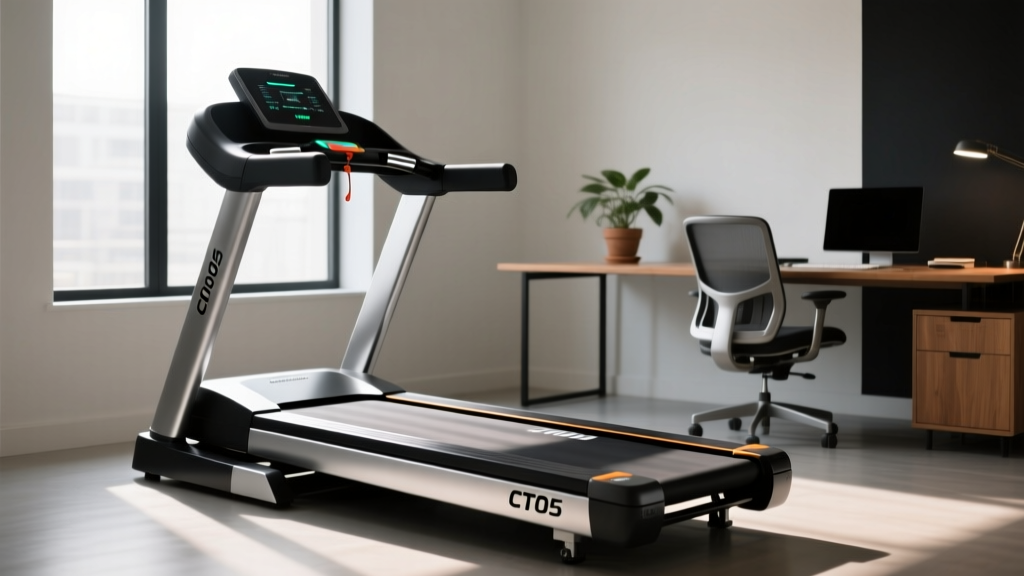
CT05 Treadmill Review: Office Use & Maintenance Tips
Discover our in-depth CT05 treadmill review for office use. Learn essential maintenance care and longevity tips to keep your under-desk walking pad running.

The transition to hybrid and remote work models has permanently altered the home office landscape. As professionals seek ways to combat the sedentary nature of desk jobs, under-desk walking pads have transitioned from niche gadgets to essential ergonomic equipment. Among the myriad of options available in 2026, the CT05 treadmill has emerged as a highly discussed model, balancing affordability with a compact footprint. However, buying an under-desk treadmill is only the first step; understanding how to maintain it in a high-dust, continuous-use office environment is what separates a one-year wonder from a decade-long fitness companion.
In this comprehensive review and maintenance guide, we evaluate the CT05 treadmill specifically for office use, diving deep into the mechanical realities of walking pads. More importantly, we provide an expert-level maintenance framework to maximize the longevity of your investment, ensuring quiet operation and motor reliability for years to come.
CT05 Treadmill: Quick Office Specs
- Motor: 1.25 Continuous Horsepower (CHP) / 2.5 Peak HP
- Speed Range: 0.5 to 4.0 MPH (Optimal for typing/walking at 1.5 - 2.0 MPH)
- Running Area: 44" L x 16" W (Accommodates average stride lengths)
- Weight Capacity: 265 lbs
- Acoustic Output: ~62 dB at 2.0 MPH (Quiet enough for phone calls)
- Deck Height: 4.5 inches (Fits under most standard and standing desks)
The CT05 Treadmill: An Honest Office Use Review
When evaluating any under-desk treadmill for office use, three factors dictate daily usability: acoustic footprint, deck stability, and console integration. The CT05 treadmill performs admirably across these metrics, though it requires specific user adjustments to truly shine in a corporate or home-office setting.
Acoustically, the CT05 utilizes a brushless DC motor that keeps ambient noise around 62 decibels at a moderate 2.0 MPH walking pace. This is roughly equivalent to a normal conversational volume, meaning you can comfortably take Zoom calls without the rhythmic thumping that plagues cheaper, brushed-motor alternatives. However, the 16-inch width of the running belt demands a centered walking posture. Users who tend to splay their feet or drift laterally will find the 16-inch width slightly restrictive compared to the 20-inch belts found on premium commercial walking pads.
From an ergonomic standpoint, the 4.5-inch deck height is a major advantage. According to Cornell University's Ergonomics Web, the ideal sit-stand-workstation requires seamless transitions between postures without requiring drastic monitor or keyboard height adjustments. The CT05's low profile allows it to slide under standard 28-inch desks, though you will likely need to raise your monitor and keyboard tray to maintain proper ergonomic alignment while in motion. The integrated shock-absorption elastomers beneath the MDF deck do an excellent job of dampening footstrike vibrations, preventing that distracting resonance from traveling up your desk legs and shaking your coffee mug.
Critical Maintenance Care for Under-Desk Treadmills
The number one reason under-desk treadmills fail prematurely is not motor burnout; it is neglect of the belt-deck interface and dust ingestion. The CT05 treadmill is no exception. Because it sits directly on the floor in an office environment, it acts as a magnet for pet dander, carpet fibers, and dust bunnies, which can easily be pulled into the motor compartment.
1. Precision Belt Lubrication and Tensioning
Friction between the PVC walking belt and the wooden deck generates heat. Over time, this heat degrades the belt, stretches the material, and forces the 1.25 CHP motor to draw excess amperage, eventually tripping the thermal overload switch. To prevent this, the CT05 requires lubrication with 100% pure silicone treadmill oil every 40 to 50 hours of use (roughly every 2 to 3 months for a daily walker).
Warning: Never use WD-40, petroleum-based lubricants, or household oils on your CT05 treadmill. These substances will chemically break down the PVC belt and destroy the deck's low-friction coating, voiding your warranty and requiring a complete belt replacement.
The Lubrication Protocol:
- Unplug the treadmill from the power source.
- Lift the edge of the walking belt near the center of the deck.
- Apply exactly 10ml (about half a standard applicator bottle) of 100% silicone oil in a zigzag pattern across the width of the deck.
- Plug the unit back in, turn it on to 1.5 MPH, and let it run empty for 3 to 5 minutes to distribute the oil evenly.
2. Dust and Debris Mitigation
Office environments are notoriously dusty. The CT05's motor hood features side ventilation slats that actively pull in room air to cool the lower control board (LCB) and motor. If these slats clog, the motor overheats. Every 30 days, use a can of compressed air or a soft-bristle vacuum attachment to clear the motor hood vents and the area beneath the rear roller. Additionally, wipe down the belt edges with a damp microfiber cloth weekly to prevent dust from embedding into the belt's textured surface, which can transfer to your shoes and office flooring.
Structured Maintenance Schedule
To systematize the care of your CT05 treadmill, adhere to the following maintenance matrix. This schedule is calibrated for a user walking approximately 1.5 to 2 hours per day, 5 days a week.
| Frequency | Maintenance Task | Tools / Materials Required |
|---|---|---|
| Daily | Visual inspection for debris under the belt; wipe down console/remote. | Microfiber cloth |
| Weekly | Clean belt edges; check belt tracking (ensure it remains centered). | Damp cloth, 5mm Hex Key (Allen wrench) |
| Monthly | Vacuum motor hood vents; inspect power cord for fraying or pinch points. | Vacuum with brush attachment |
| Quarterly | Apply 10ml 100% silicone lubricant; check rear roller tension. | 100% Silicone Treadmill Oil, 5mm Hex Key |
| Bi-Annually | Remove motor hood cover (4 Phillips screws) to gently vacuum internal LCB dust. | Phillips screwdriver, compressed air |
Troubleshooting Common CT05 Failure Modes
Even with meticulous care, under-desk treadmills can encounter operational hiccups. The CT05 utilizes a standard LED diagnostic display that flashes specific error codes when the internal sensors detect anomalies. Understanding these codes allows you to perform at-home triage rather than immediately filing a warranty claim.
Error Code E01: Communication Failure
This indicates a loss of signal between the console (or remote receiver) and the Lower Control Board (LCB) housed in the motor compartment. In an office setting, this is frequently caused by a pinched data cable. The Fix: Unplug the unit, remove the motor hood, and trace the thin ribbon cable connecting the front upright/display to the LCB. Ensure it hasn't been severed by the motor belt or crushed beneath the plastic casing. Reseat the connections firmly.
Error Code E02: Overcurrent / Motor Surge
E02 triggers when the motor draws more amperage than the LCB can safely handle. This is almost always a symptom of extreme belt-deck friction or a belt that has been over-tightened. The Fix: First, apply silicone lubricant as detailed above. If the code persists, use your 5mm hex key to loosen the rear roller adjustment bolts on both sides by exactly one-quarter turn to relieve tension on the motor.
Error Code E05: Thermal Overload
The CT05 is designed for walking, not continuous marathon sessions. If you run the treadmill for more than 90 minutes continuously, the internal thermistor will trigger an E05 shutdown to prevent the motor windings from melting. The Fix: Turn the power switch off, unplug the unit, and allow it to cool for 45 minutes. To prevent recurrence, adhere to the manufacturer's recommended duty cycle of 60 minutes on, followed by a 15-minute cool-down period.
Maximizing Longevity: Environmental and Electrical Factors
The physical mechanics of the CT05 treadmill are only half the longevity equation; the electrical environment of your office plays a massive role in the lifespan of the lower control board. The LCB is a sensitive piece of circuitry that regulates power distribution to the motor. It is highly susceptible to voltage spikes, static electricity, and power sags.
Plugging your under-desk treadmill directly into a standard wall outlet or a cheap, overloaded power strip is a recipe for a fried LCB. We strongly recommend investing in a high-quality Uninterruptible Power Supply (UPS) or a premium surge protector rated for a minimum of 2,000 joules with a clamping voltage of 400V or less. Furthermore, in dry, climate-controlled office environments, static electricity can build up on the walking belt and discharge into the console, causing random resets or remote-control pairing failures. Using an anti-static spray on the surrounding carpet (avoiding the belt itself) and maintaining room humidity between 40% and 50% will drastically reduce static discharge incidents.
According to the Centers for Disease Control and Prevention (CDC), integrating regular movement into the workday is vital for long-term cardiovascular health and metabolic function. The CT05 treadmill facilitates this Non-Exercise Activity Thermogenesis (NEAT) beautifully, provided it is treated as a piece of precision machinery rather than a disposable appliance.
Expert Verdict: Is the CT05 Worth the Desk Space?
As an under-desk treadmill for office use, the CT05 strikes an exceptional balance between cost, acoustic discretion, and mechanical reliability. While it lacks the 20-inch wide decks and integrated incline features of commercial-grade walking pads that cost three times as much, it delivers exactly what the hybrid worker needs: a quiet, low-profile platform for daily step accumulation.
However, its longevity is entirely dependent on the user's commitment to the maintenance protocols outlined above. If you are willing to spend 15 minutes every quarter lubricating the belt and vacuuming the motor vents, the CT05 treadmill will easily provide 5 to 7 years of reliable service. Neglect it, and the friction and dust will degrade the motor within 18 months. Treat it with mechanical respect, and it will serve as the cornerstone of your active office routine for years to come.
More gear to consider
All reviews
Pro Performance 400 Treadmill & Bike Types: Space Layouts
Sole F63 Treadmill Disassembly: Motor Size & HP Guide

Bowed Treadmill vs Motorized: 2026 In-Depth Buying Guide

Feier Treadmill Star 100 Belt Lubrication: Budget & Value Guide
T Series 10 Treadmill Review & Stair Climber Guide
