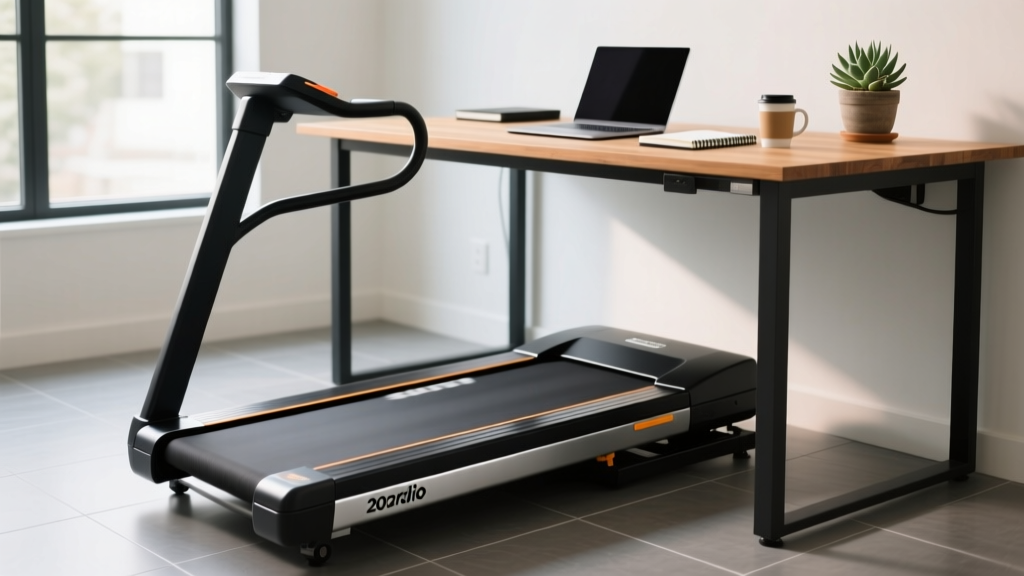
Under Desk Treadmill Review: Fixing Treadmill No Power Faults
Reviewing top 2026 under-desk treadmills for office use. Learn expert maintenance tips and how to troubleshoot a sudden treadmill no power fault.

The 2026 Under-Desk Treadmill Landscape: Durability vs. Convenience
As hybrid and remote work models solidify in 2026, the under-desk treadmill has transitioned from a niche productivity hack to a staple of the home office. However, the market is flooded with ultra-slim walking pads that prioritize aesthetics over mechanical longevity. While a full-sized commercial treadmill is engineered for thousands of hours of continuous impact, budget walking pads often suffer from inadequate cooling, subpar motor control boards (MCBs), and fragile folding hinges.
For the daily office walker, the most frustrating and common failure mode is the sudden treadmill no power fault. You step on the belt, press the remote, and nothing happens. This guide reviews the top under-desk treadmills for office use through the lens of long-term maintenance, and provides a master-level diagnostic guide to resurrecting a dead walking pad.
Top 3 Office Walking Pads Reviewed for Longevity
When evaluating under-desk treadmills, we look past the marketing jargon and focus on motor thermals, belt composition, and electronic safeguards. Here is how the top 2026 contenders hold up to daily office abuse.
1. Lifespan Fitness TR1200-DT3 (The Longevity King)
- Price: $849
- Motor: 2.5 HP Continuous Duty
- Weight Capacity: 350 lbs
- Verdict: Unlike folding pads, the TR1200-DT3 is a one-piece solid deck unit. It utilizes a commercial-grade MCB and heavy-duty rollers. It rarely experiences the treadmill no power thermal shutoffs that plague folding models because its internal chassis allows for active airflow. It is heavy (52 lbs), making it difficult to move, but it will easily survive 5+ years of daily 4-hour walking sessions.
2. KingSmith WalkingPad X21 (The Commuter's Choice)
- Price: $499
- Motor: 1.25 CHP
- Weight Capacity: 240 lbs
- Verdict: The X21 features an innovative 180-degree dual-fold design. However, this introduces a critical failure point: the internal power ribbon cable routes directly through the central folding hinge. After 12 to 18 months of daily folding and unfolding, the ribbon cable can pinch or fray, resulting in an intermittent or permanent treadmill no power scenario. If you buy this, treat the hinge gently and never force it.
3. UREVO Strol 2E (The Budget Workhorse)
- Price: $279
- Motor: 2.25 HP (Peak)
- Weight Capacity: 265 lbs
- Verdict: A massive seller due to its price and included steering handle. The primary longevity issue here is factory belt lubrication. UREVO belts often ship dry. If you do not apply 100% silicone lubricant within the first 10 hours of use, belt friction will cause the motor to draw excessive amperage, eventually blowing the internal MCB fuse and triggering a dead unit.
The Dreaded 'Treadmill No Power' Fault: Anatomy of a Failure
Why do under-desk treadmills suddenly refuse to turn on? Unlike full-sized treadmills that plug directly into a 120V AC wall outlet, most slim walking pads utilize external DC power bricks (similar to laptop chargers) or cheap internal rectifiers to step down the voltage to 24V or 42V DC.
⚠️ Expert Insight: The Dust Bunny Thermal TrapOffice environments are notorious for static-charged dust and pet hair. Walking pads sit flush against the floor, acting as vacuums. When dust clogs the MCB heat sink, the MOSFET transistors overheat and short out. This is the #1 cause of a treadmill no power fault in units older than 6 months.
Step-by-Step Diagnostic Guide: Treadmill No Power
Before throwing your $400 walking pad in the dumpster, grab a digital multimeter and follow this diagnostic sequence to isolate the fault.
- Verify the Wall Circuit and Power Brick Output:
Set your multimeter to DC Voltage (200V range). Unplug the power brick from the treadmill but leave it plugged into the wall. Insert the probes into the barrel connector. A 24V system should read between 24.5V and 25.2V. If it reads 0V, the power brick is dead. Replacement bricks cost $30-$45 on Amazon. Ensure the replacement matches the exact Amperage (e.g., 24V 4A) or higher; never use a lower amperage brick. - Check the Safety Key Reed Switch:
Many walking pads require a magnetic safety key. Inside the console, a reed switch completes the low-voltage circuit. If the magnet in the key is weak, or the reed switch has shifted 2mm out of alignment due to vibration, the MCB will not receive the 'enable' signal. Bypass the switch temporarily with a jumper wire to test. - Inspect the Folding Hinge Ribbon Cable:
If you own a folding model (like the KingSmith), use a flashlight to inspect the fabric or rubber sleeve covering the central hinge. Look for exposed copper or sharp creases. A severed 5V logic line in this ribbon will instantly cause a treadmill no power symptom at the display console. - Test the MCB Fuse and MOSFETs:
Unplug the machine. Remove the plastic motor shroud (usually 4 to 6 Phillips head screws). Locate the Motor Control Board. Look for a glass or ceramic fuse; test it for continuity. If the fuse is blown, do not just replace it. A blown fuse indicates a shorted MOSFET. If the black transistor chips on the heat sink show continuity across all three legs, the board is fried and must be replaced (typically $60-$90 from the manufacturer).
Preventative Maintenance Matrix for Office Treadmills
Longevity is entirely dependent on reducing the coefficient of friction between the belt and the deck. According to Consumer Reports Treadmill Guide, improper lubrication is the leading cause of premature motor burnout in home fitness equipment.
| Maintenance Task | Frequency | Tools Required | Longevity Impact |
|---|---|---|---|
| 100% Silicone Belt Lubrication | Every 40 hours of use | Silicone squeeze bottle, L-tool | Prevents MCB thermal overload and deck warping. |
| Belt Tension & Tracking Adjustment | Every 3 months | 6mm Allen wrench | Reduces amp draw; belt should lift 2 inches off deck. |
| MCB & Motor Compartment Vacuuming | Monthly | Shop-Vac with brush attachment | Prevents dust-induced MOSFET short circuits. |
| Roller Bearing Inspection | Annually | Flashlight, replacement rollers | Stops belt stuttering and edge fraying. |
Office Ergonomics and Safety Standards
While maintaining the machine is critical, maintaining your body is equally important. The Occupational Safety and Health Administration (OSHA) emphasizes that alternating between sitting, standing, and walking is vital for preventing musculoskeletal disorders in desk workers. However, walking on a treadmill while typing requires specific ergonomic adjustments.
Pro-Tip: Keep your walking speed between 1.0 and 1.5 MPH while actively typing. Speeds above 2.0 MPH introduce lateral pelvic sway, which forces your wrists into ulnar deviation, increasing the risk of carpal tunnel syndrome over long 2026 workdays.
Furthermore, safety must remain a priority. The Consumer Product Safety Commission (CPSC) regularly issues warnings regarding treadmill-related friction burns and entrapment hazards, particularly in home environments where children or pets may be present. Always utilize the magnetic safety key, and unplug the walking pad entirely when not in use to prevent accidental activation via rogue Bluetooth signals or remote control interference.
Final Verdict: Protecting Your Investment
An under-desk treadmill is a phenomenal tool for combating the sedentary nature of modern office work, but it requires a shift in mindset. You cannot treat a $300 walking pad like a $3,000 gym treadmill. By understanding the root causes of the treadmill no power fault—specifically thermal overload, ribbon cable fatigue, and belt friction—you can perform your own diagnostics and avoid premature e-waste. Invest in a bottle of silicone lubricant, keep a multimeter in your desk drawer, and your office walking pad will keep your steps up and your stress down for years to come.
More gear to consider
All reviews
Treadmill Belt Lubrication vs Treadmill Rollers Replacement Costs
Treadmill Before and After: 2026 Buying Guide & Feature Comparison

ProForm Treadmill 400 GI Belt Maintenance: Lubrication & Care Guide
Rowing Technique & Buying Guide: The Treadmill Was Invented in 1818

WalkingPad R1 Treadmill Motor Size & Horsepower Guide
